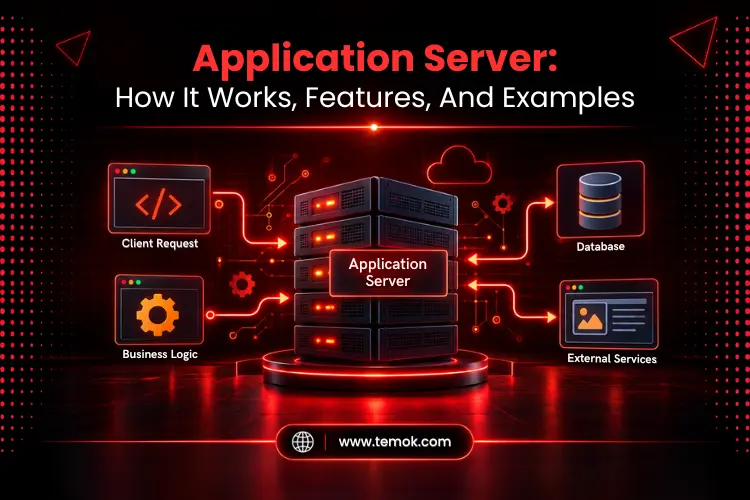

An application server or app server is a type of software layer that provides the services and environment required to run application logic, connect to databases, manage users, and process dynamic requests. It actually runs the real logic behind your website and business apps and lies between front-end users and databases.
Moreover, unlike a traditional web server that mainly provides web resources, an app server can handle the complex work behind modern business applications.
This guide clearly explains what is an app server, how it processes a request from scratch to finish, and much more. So, keep reading and exploring to learn more amazing insights about app servers.
Key Takeaways
- An application server runs app logic and delivers top services that mainly assist different applications in communicating with databases and other backend systems.
- It effortlessly handles transactions, user sessions, authentication, security, database connections, and other app-level tasks.
- The general request flow is: Client → web or application server → application logic → backend resources → response
- Most popular app server examples include Microsoft IIS with ASP.NET, WildFly, Apache Tomcat, and Oracle WebLogic.
- Not all websites require an app server. Simple websites may simply need a web server, but more complicated applications might benefit from centralized application services using an app server.
What is an Application Server?
An application server is a software framework that is located on the server side and connects clients such as web browsers or mobile apps with backend business apps or databases.
App servers have become an essential tool for many modern businesses, allowing teams to design and launch different web apps, improve app performance, and provide better end-user experiences to their users.
In reality, the most important application server definition is that it is the layer that runs your application code, connects to a database, handles user sessions, and provides processed results to the user.
What Does an Application Server Do?
The major application server functions include:
- Executing business and application logic
- Communicating with databases
- Managing transactions
- Handling user sessions
- Supporting authentication and security
- Connecting applications with APIs and other services
- Managing application resources
Such services make a business app easier to organize and scale as its major workload grows.
How Does an Application Server Work?
An app server works by receiving a request, processing the app logic behind it, communicating with necessary backend resources, and sending the final outcome back to the client. This increases the importance of the app server to an app’s processing layer.
A general app server working flow may look like this:
Client → Web Server/Application Server → Application Logic → Database/Backend Service → Response
1. The Client Sends a Request
An app user opens the app, orders a product, submits a form, or performs any other action. Then, the web browser or mobile app the user is using sends a request to the main server over the network.
2. The Application Server Processes the Request
After receiving the request from a web browser or mobile application, it figures out which part of the application code should handle the task. The server may also verify authentication, user sessions, permissions, and other requirements.
3. Business Logic Is Executed
The application carries out the specified task. This might include generating or calculating an invoice, processing an order, reviewing account information, or confirming provided data via a form.
4. Backend Resources Are Accessed
If the application needs more information from a database, external API, file system, payment service, or other backend system, the server may send a query to that database to fetch or update the required data.
5. The Response Is Returned to the Client
After the request processing is finished, the final outcome is sent back to the user. This could be a JSON response, HTML page, account info, product information, or another app result.
Also Read: Report Application Server: Ultimate Guide For Reliable Reporting Systems
What Are the Key Features of an Application Server?
Application server features include business logic execution, database connectivity, transaction management, session administration, scalability, and load management. These features are particularly designed to make complex apps easier to run, connect, secure, and scale. However, the specific features rely on the platform and configuration.
Business Logic Execution
An app server creates an environment in which application code may operate. This enables app developers to retain critical rules and procedures on the server rather than exposing them to users.
Database Connectivity
Application code can interact with databases more efficiently with built-in connection pooling and drivers instead of creating a new slow connection per request.
Transaction Management
Transaction management helps in the successful completion of related database activities. This is notably important for banking systems, ecommerce platforms, and other systems where incomplete activities might lead to major issues.
Session Management
This feature of the app server tracks who is logged in to the application and what they are doing across multiple requests, so the app user will not have to re-authenticate on every single click.
Security and Authentication
App servers are capable of handling authentication, authorization, access control, and secure communication. These features allow applications to determine who has access to specified resources.
Scalability and Load Management
As traffic spikes, apps may need to operate on numerous servers. Load distribution, clustering, and other approaches for dealing with bigger workloads are available in app server settings.
Application Integration
Modern and complex apps rarely work independently. They have to communicate with different databases, APIs, payment systems, authentication systems, and many other platforms. In that case, an app server can assist in organizing these connections through application integration.
What Are The Main Types of Application Servers?

Main application server types include Java app servers, .NET app servers, and web app servers. These types are often classified with respect to the programming ecosystem and platform they support, rather than vastly different underlying architectures.
Java Application Servers
Java-based applications support the Java and Jakarta EE ecosystems. They are often used in business applications that require transactional capabilities, security, database connectivity, and scalable application administration.
.NET Application Servers
.NET app servers support apps that are built on Microsoft’s development infrastructure. These servers are generally used for enterprise applications, web apps, enterprise software, and APIs.
Web Application Servers
A web app server enables dynamic web applications and APIs. Based on the platform, it may mix application processing and web-serving duties. The crucial issue is that app server capabilities are different per platform; hence the product’s real characteristics are more relevant than its title.
Application Server Examples
Popular application server examples include Apache Tomcat, WildFly, Eclipse GlassFish, Oracle WebLogic, IBM WebSphere, and Microsoft IIS with ASP.NET.
| Application Server | Common Use |
|---|---|
| Apache Tomcat | Java Web Applications |
| WildFly | Jakarta EE Enterprise Applications |
| Eclipse GlassFish | Jakarta EE Applications |
| Oracle WebLogic Server | Enterprise Java Applications |
| IBM WebSphere | Enterprise Applications |
| Microsoft IIS with ASP.NET | .NET Web Applications |
It’s worth noting that terminology differs across this list. Some of these products serve primarily as runtime containers or web servers while also offering application server features, therefore they should not be considered architecturally equivalent simply because they appear in the same table.
Also Read: Behind Every Website: How Servers, Domains, and Technology Power the Internet
Application Server vs Web Server: What’s the Difference?
An app server and a web server both play a very important role in web development, yet they serve different objectives. A web server primarily handles and processes HTTP requests, serves web resources, and delivers the main content. On the other hand, an app server provides an environment for implementing app logic and managing application-level services.
For better understanding, take a look at the table below:
| Feature | Web Server | Application Server |
|---|---|---|
| Primary Role | Serves Web Content | Executes Application Logic |
| Content | Mainly HTTP/Web Resources | Dynamic Application Processing |
| Prime Protocols | HTTP/HTTPS | REST, SOAP, RPC, RMI, and HTTP |
| Business Logic | Limited | Core Function |
| Database Interaction | Usually Indirect | Common |
| Transaction Management | Limited | Often Supported |
| Resource Utilization | Low | High |
| Typical Use | Websites and Static Resources | Complex Applications |
| Example | NIGINX, Apache | Tomcat, WebLogic, and IBM WebSphere |
In practical terms, the two can work together. For example, a web server can receive an HTTP request and forward only the dynamic requests to an app server. Moreover, an app server then processes the business logic and returns the result to the user.
If you want a deeper comparison, read our dedicated comparison: Web Server vs Application Server: Understanding The Key Differences
What Are The Benefits of Application Servers?

Benefits of app server architecture include centralized app logic, better scalability, improved security, efficient resource management, and easier app integration. Moreover, an app server can effortlessly simplify complex software context by centralizing critical services and offering app developers a well-structured platform for running application logic.
Other main benefits include:
Centralized Application Logic
Business policies live in one controlled layer rather than being spread throughout the front end, so they are far more predictable to update and maintain.
Better Scalability
Application servers are regarded as highly scalable business solutions because of their capacity to handle several requests at the same time. Many app servers include load balancing, which allows them to split compute duties over different nodes and maintain peak performance even when traffic spikes occur.
Improved Security
Access management solutions frequently link to app servers, allowing organizations to regulate rights using a variety of security features such as authorization, authentication, and data encryption.
Efficient Resource Management
Connection pooling and resource management prevent repeated, wasteful processes from consuming database and server resources.
Easier Application Integration
Complex applications sometimes need to interact with multiple backend systems. In that case, a well-designed app server environment can easily streamline such connections.
What Are the Limitations of Application Servers?
Undoubtedly, app servers can provide powerful features, but they also have additional complexity. Therefore, they are not best suited for every project.
Here are some of the core limitations of application server functions you must not neglect:
- Enhanced complexity in the infrastructure in contrast to a straightforward static website setup.
- Increased use of resources, as the server requires both processing power and memory to operate.
- Demands for configuration and management that require genuine technical knowledge.
- Potential performance lag from the extra processing layer (especially if not well optimized).
- Continuous necessity for oversight and upkeep to ensure everything functions properly.
When Do You Need an Application Server?
An application server might be necessary if your application involves complex backend operations, transaction management with databases, handling user sessions, integrations with enterprise systems, or needs centralized services for the application.
An app server becomes especially useful when your application requires:
- Complex business logic
- Database transactions
- User and session management
- Enterprise integrations
- Authentication and authorization
- High availability or scalability
- Centralized application services
For example, a banking platform may need to authenticate its account holders, manage debit/credit cards, process loans, communicate with banking systems, and update a database. In that case, you need an app server to handle such tasks.
But a personal blog or portfolio website doesn’t necessarily need the same infrastructure and can be run on a basic web server alone. That’s why not every website or app necessarily needs an app server the old way.
Frequently Asked Questions
What is an application server with an example?
An application server (app server) is a software layer that executes business logic, processes multiple user requests, and then connects the result to the backend databases. For example, Apache Tomcat is a popular example in use that runs common Java web apps that require servlet and JSP processing with dynamic and data-driven functionality.
What’s the difference between an application server and a web server?
The main difference is that a web server delivers static content like HTML pages, images, and different files over HTTP. In contrast, an app server runs the dynamic business logic, handles different database transactions, and regulates user sessions.
How much does an application server cost?
The cost may differ depending on your chosen application server software. Software like Apache Tomcat and WildFly is universally open-source and free to use. Moreover, commercial software like Oracle WebLogic Server and IBM WebSphere includes licensing fees that may go up with server count, usage, and required support level. These costs can reach up to thousands of dollars yearly on the basis of enterprise deployments.
Is IBM WebSphere still used?
Yes, IBM WebSphere is still in active use in 2026, especially within large organizations that adopted it decades ago for complex Java applications.
Conclusion
An app server is likely more than a machine that provides web pages to the end users. It offers an ecosystem where different app logic can run and gives them access to different services like database connectivity, authentication, transactions, backend integration, and user sessions.
Understanding what is application server technology will surely help you make wise infrastructure decisions. However, remember that not every website or application needs an app server. But applications that have complex business logic and backend requirements can benefit from it at a larger scale.
The most important thing is to match the architecture to the workload. If your project only serves static content, a standard web server could be enough. An application server can also provide you with the structure and services you need to consistently run an application and that application can deal with users, transactions, databases, APIs and complex business rules.