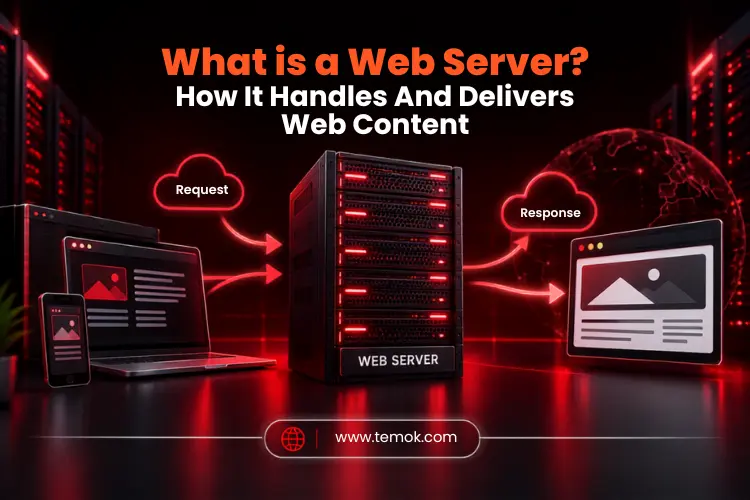

A web server refers to the hardware, software, or combination of both that stores, processes, and then delivers the final web content to end users over a web browser through the internet. Understanding what is a web server is important because many individuals confuse it with an application server, web browser, and other terms.
The time when you visit a website through a web browser, you are actually interacting with a web server to access the actual web page you wish to view. The server receives your request and sends back the data or files to the web browser that are required to display the requested web page.
Web servers are actually silent pillars of the digital age. They are the most powerful engines that keep, process, and provide the web content to your screen 24/7 without stopping.
This guide explains the main web server meaning, types of web servers, web server examples, and much more. So, keep reading and exploring to learn about the real web server definition.
Key Takeaways
- A web server is a computer system that can provide web content to end users via the internet using a web browser.
- The term “web server” can refer to either the (hardware) physical server or the software that runs on it.
- Web browsers mainly connect with servers using HTTP and HTTPS.
- Famous web server software includes Apache web server, NGINX web server, and Microsoft IIS web server.
- Static content can be delivered directly, while dynamic content may require application software and databases.
- Web servers support websites, web applications, APIs, file distribution, and other internet-based services.
What is a Web Server?
A web server refers to a computer system or software that hosts websites and provides users with web pages when they request them. Consider it the powerful engine that runs the internet, allowing you to access your favorite DIY videos, online shopping carts, and even this blog.
To better understand what is a web server, you must understand its two sides:
- Hardware: A computer or virtual machine that stores website data and offers computing power.
- Software: A program that receives, processes, and responds to web requests.
For example, when you enter a URL or website address into your web browser, the web browser sends a request to the appropriate web server. Moreover, the server then identifies the requested resource and returns it to the browser with the web content.
Most people perceive web servers as hardware in a data center that processes requests. In reality, the web server’s physical hardware really stores and sends files to clients; however, software is still required to process any request and direct the hardware on what data to send back to the client.
What Does a Web Server Do?
A web server mainly handles requests from the client and delivers responses. However, its actual uses may include much more.
Typical web server uses include:
- Hosting websites
- Delivering static files
- Handling HTTP/HTTPS requests
- Serving web apps
- Directing requests to application software
- Working with databases across application layers
- Access control to resources of the website
- Recording request and error logs
- Supporting caching and compression
- Handling high numbers of simultaneous connections
Depending on the design of the website, a web server might sit behind a reverse proxy or load balancer.
After learning what is a web server, let’s understand how does it actually work.
How Does a Web Server Work?
Simply put, a browser submits a request, the server processes it, locates or creates the relevant content, and returns an HTTP response to the browser.
The process normally looks like this:
Browser request → Server receives request → Resource is located or generated → HTTP response is created → Browser receives content → Page is displayed
Understanding what is a web server and how web servers work is considerably easier when you follow a normal website request. It utilizes the following:
- Physical storage: All website data is saved on a physical web server to protect its security. Moreover, when a user enters the URL of your website or searches for it using a keyword in a web browser, a request is made and sent to the web server to process the data.
- Web browser: The main role of web browsers such as Firefox, Chrome, or Microsoft Edge is to locate the web server where your website data is stored; once found, the browser interprets the request and processes the information.
HTTP vs HTTPS Requests
HTTP stands for Hypertext Transfer Protocol. It specifies how clients and servers interact while accessing and delivering online resources.
Moreover, HTTPS adds TLS encryption, which protects data sent between the browser and the server.
A typical HTTP web server must interpret HTTP requests and produce correctly structured HTTP responses. On the other hand, HTTPS is now a very standard approach on modern websites since it secures data in transit and allows for secure communication.
HTTP requests can have several forms. GET is typically used to access resources, whereas POST is used to deliver data to a server, such as information entered into a form.
After learning what is a web server and how does work, let’s discuss different web server components.
Also Read: Top Techniques in Securing Web Servers Against Unauthorized Requests
Different Web Server Components You Must Know
The main web server components include server hardware, operating system resources, web server software, website files, networking, and, for dynamic websites, application and database layers.
To better understand the role of each component, let’s look at the table below:
| Component | Main Role |
|---|---|
| Server Hardware | Delivers CPU, memory, storage, and network resources |
| Operating System | Manages the hardware & software resources |
| Web Server Software | Processes HTTP requests and responds |
| Website Files | Contains HTML, CSS, JavaScript, images, and more content |
| Network | Connects clients to the server |
| Application Server | Handles dynamic application requests |
| Database | Stores organized application data |
| Security Tools | Help regulate and safeguard access |
Web Server Software vs Server Hardware
The server hardware refers to the physical or virtual computer environment in which services execute. Whereas the web server software is the application that handles web requests. These two notions are connected, but not the same.
For example, a single physical server can support several software services. Similarly, current cloud infrastructures may scale a website across several virtual machines or server instances. A web server could also mean hardware and software working together.
If you want to deeply understand what is a web server, you must know its different types. So, now we will discuss the different types of web server software.
What Are The Different Types of Web Servers?

The most common types of web server software include Apache web server, NGINX web server, Microsoft IIS web server, LiteSpeed web server, and Linux web server software. Moreover, the widespread web hosting ecosystem contains many other web server types and configurations, so you can choose best web server from a number of open source web servers.
However, the phrase “types of web servers” can be used in many ways. Some individuals classify servers by software, while others define websites as static or dynamic.
To practically understand what is a web server and its components, below are some of the most well-known types of web server software:
1. Apache Web Server
Apache has been the web’s backbone for decades. It is open-source, tremendously powerful, and highly adaptable.
Moreover, it is best known for its .htaccess file, which allows you to customize server settings per directory. Additionally, it is a reliable, universally recognized, and proven option that powers a sizable portion of all websites.
2. NGINX Web Server
The NGINX web server is an HTTP server that may also operate as a reverse proxy, content cache, load balancer, and TCP/UDP proxy.
NGINX is often used in designs that need efficient handling of multiple concurrent connections. It may serve static files directly and forward requests to application servers. This makes NGINX suitable for both simple hosting setups and more complicated web infrastructures.
3. Microsoft IIS Web Server
IIS, or Internet Information Services, is Microsoft’s web server, and it comes with the Windows Server operating systems.
IIS is most commonly seen in corporate setups or on servers that require Microsoft-specific technologies such as ASP.NET to operate. Moreover, it is not commonly used to host open-source systems such as WordPress.
4. LiteSpeed Web Server
This is a high-performance commercial option that is typically quicker than NGINX, particularly for websites with dynamic content like WordPress.
It was designed to be a direct replacement for Apache, allowing it to utilize the same configuration files while giving faster performance via integrated caching.
5. Linux Web Server
A Linux server operates on the open-source Linux operating system and allows you to provide content, applications, and services to end users.
Moreover, Linux servers are versatile, stable, and high-performing, with snapshot capabilities, optimal security, and scalable cloud technologies. These servers help meet the growing need for online services, applications, database administration, and other services.
After learning what is a web server, its working, and types, let’s discuss the major difference between static and dynamic web servers.
Static Web Server vs Dynamic Web Server: What’s the Difference?
A static web server distributes pre-built files precisely as they are stored, whereas a dynamic web server interprets data on the spot, utilizing software and databases to generate a unique website for each request.
The role of a server might be simple or complex, depending on the sort of website it hosts. The most significant distinction is between providing static and dynamic content. Here is the core difference between the two:
Static Web Server
A static web server consists of hardware or a computer that runs an HTTP server. These servers are static since they assist in showing hosted content. The finest example of a static web server is the NGINX server.
Dynamic Web Server
Dynamic web servers consist of a static server, an application server, and a database. These servers are dynamic because they employ the application server to change hosted files before transmitting them to the user’s browser over HTTP.
A dynamic website may update and show a variety of information, including photos, videos, and HTML text. Apache is an excellent example of a dynamic web server.
Also Read: Static Website vs Dynamic Website: Ultimate Comparison For Smart Business Decisions
Web Server vs Web Browser: What is the Difference?
A web browser actually requests web content from web servers and displays the web content, while a web server gets those requests and delivers the requested content or response. To better understand what is a web server and a web browser difference, take a look at the table below:
| Web Browser | Web Server |
|---|---|
| Runs on the user’s device | Runs on server infrastructure |
| Sends web requests | Receives and processes requests |
| Displays webpages | Delivers webpages and resources |
| Processes HTML, CSS, and JavaScript | Provides the requested resources |
| Examples include Chrome and Firefox | Examples include Apache, NGINX, and IIS |
| Application Server | Handles dynamic application requests |
| Database | Stores organized application data |
| Security Tools | Help regulate and safeguard access |
How To Choose the Right Web Server Software?
The operating system, application stack, expected traffic, configuration requirements, security demands, and technical skills all play a role in choosing reliable web server software.
For a small static website, you may not need a complicated architecture. A high-traffic online application may require a reverse proxy, load balancing, caching, automated deployment, and other backend services.
Before making your decision, consider the following factors:
- Compatibility with your operating system
- Application and programming language requirements
- Estimated traffic and concurrent connections
- Static and dynamic content needs
- Security and access-control features
- Configuration flexibility
- Community and documentation
- Available technical expertise
- Hosting and infrastructure costs
- Monitoring and management requirements
There is no single web server that is ideal for every website. The best option is one that meets the technical and operational requirements of the application. Therefore, you must understand what is a web server deeply before you choose one.
Also Read: Web Server vs Application Server: Understanding The Key Differences
Common Web Server Problems and How To Prevent Them

Common web server problems include server overload, configuration errors, security vulnerabilities, delayed backend applications, and downtime. Regular monitoring, testing, upgrades and proper server configuration can help avoid these types of problems.
Here are the common web server problems and solutions you must know when understanding what is a web server:
Server Overload
Sudden traffic spikes can deplete CPU, memory, network bandwidth, and other resources.
- Solution: Caching, load balancing, scalability and resource monitoring can handle heavy traffic.
Configuration Errors
Incorrect server configurations might result in unsuccessful requests, redirect difficulties, authorization issues, or unexpected behavior.
- Solution: Configuration modifications should be evaluated before being implemented in production systems.
Security vulnerabilities
Unpatched software, insufficient access restrictions, exposed services, and unsecured settings can all pose security hazards.
- Solution: Keep server software and related components up to date, limit unneeded access, utilize HTTPS, and check logs for suspicious behavior.
Slow Application Responses
A web server may react rapidly, but the application behind it takes too long to create a response.
- Solution: Database queries, poor application code, external APIs, and inadequate resources can all cause sluggish performance. So, fix them.
Downtime
Hardware failures, software faults, network difficulties, maintenance, and infrastructure disasters can make websites offline.
- Solution: Monitoring, backups, redundancy, failover planning, and established recovery methods can assist in minimizing the effect of outages.
FAQs (Frequently Asked Questions)
Why Do I Need a Web Server?
You need a web server to access the website content online. A web server receives requests from a web browser and then sends back webpages, files, or application data.
Is Google a Web Server?
No, Google is basically a search engine and a tech company, whereas a web server helps in delivering web pages and other web content when requested.
Where Is the Web Server?
A web server may be located in a physical data center, cloud environment, or private facility. Moreover, huge websites may use web servers in different locations.
What Are the Four Types of Web Servers?
There is no definitive list of 4 types of web servers. However, common types are Apache web server, NGINX web server, LiteSpeed, Microsoft IIS, and many other web server software.
Conclusion
A web server is an ultimate combination of two main things, which are hardware and software. It consists of a powerful physical hardware machine that effortlessly stores your website’s files. Moreover, it also consists of specialized software that processes the requests and delivers those files or data to visitors.
Understanding what is a web server is not just for tech professionals or IT personnel. It is actually a core piece of knowledge for any individual looking to secure their online activities. Moreover, web servers power almost every action we perform on the internet. Therefore, knowing what a web server does will surely help you detect potential vulnerabilities, avoid higher risks, and make smarter choices about keeping your critical data and systems secure.